Cameras
This module is available in the language via the module Cameras, and provides access to the cameras defined in the project by their name (see Friendly name.
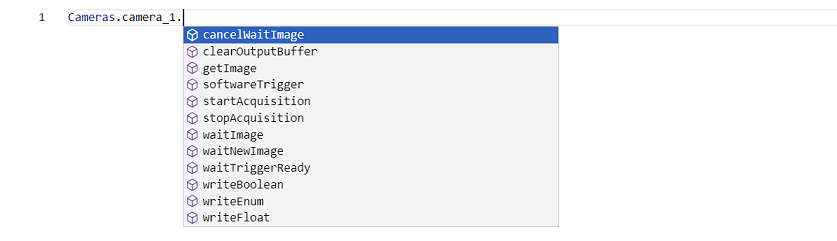
Let's suppose you have configured camera_1 in your project, inside the camera there are member functions that will be suggested to you when you write Cameras.camera_1.
startAcquisition()
Starts the streaming from the camera.
startAcquisition(): Promise<void>;
Tips
- If the camera is configured to work with software trigger, after calling this function, you will need to call softwareTrigger to acquire an image.
- If the camera is configured to acquire images continuously, this function will start the acquisition and the camera will start sending images to the software.
stopAcquisition()
Stops the streaming from the camera.
stopAcquisition(): Promise<void>;
Tips
- When the program stops, stopAcquisition is called automatically.
softwareTrigger()
Triggers the camera to acquire an image when using software trigger mode.
softwareTrigger(): void;
waitTriggerReady()
Waits until the camera is ready for the next trigger.
waitTriggerReady(timeout: number): Promise<boolean>;
timeout: Timeout in milliseconds. The function returns false if the camera is not ready before the timeout.
getImage()
Gets the oldest entry from the output buffer. If the buffer entry is multipart (composed by various images), it will return the selected image and the rest will be lost. If there is no image in the buffer it will throw.
getImage(multipartIndex?: number): Promise<Ve.Image>;
multipartIndex (optional): Index for multipart images. If not specified, the latest image is returned.
getImages()
Gets the oldest entry from the output buffer. It returns various images in case the buffer is multipart. If there is no image in the buffer it will throw.
getImages(): Promise<Ve.Image[]>;
waitImage()
Waits until a new image arrives from the camera, and then returns true. Optionally, you can specify a timeout in milliseconds, after which the function will return false if no image has arrived.
waitImage(timeout?: number): Promise<boolean>;
timeout (optional): Timeout in milliseconds. If not specified, the function will wait indefinitely.
Tips
- When stopAcquisition is called, the pending wait will be cancelled.
- You can cancel the wait by calling cancelWaitImage.
waitNewImage()
Waits until a new image arrives from the camera, and then returns true. Optionally, you can specify a timeout in milliseconds, after which the function will return false if no image has arrived.
waitNewImage(timeout?: number): Promise<boolean>;
timeout (optional): Timeout in milliseconds. If not specified, the function will wait indefinitely.
Tips
- When stopAcquisition is called, the pending wait will be cancelled.
- You can cancel the wait by calling cancelWaitImage.
cancelWaitImage()
Cancels the pending image wait.
cancelWaitImage(): Promise<boolean>;
clearOutputBuffer()
Clears the camera's output buffer.
clearOutputBuffer(): Promise<void>;
writeBoolean()
This function writes a boolean value to the specified feature of the camera.
writeBoolean(featureName: string, value: boolean): void;
featureName:The exact name of the feature as it appears in the camera's feature list.value:The boolean value to write.
Tips
- If the camera is acquiring images or in video mode, features might be locked and this function will throw an error.
writeInteger()
This function writes an integer value to the specified feature of the camera.
writeInteger(featureName: string, value: number): void;
featureName:The exact name of the feature as it appears in the camera's feature list.value:The integer value to write.
Tips
- Ensure the feature supports integer values to avoid exceptions.
- If the camera is acquiring images, features might be locked and this function will throw an error.
writeFloat()
This function writes a floating-point value to the specified feature of the camera.
writeFloat(featureName: string, value: number): void;
featureName:The exact name of the feature as it appears in the camera's feature list.value:The floating-point value to write.
Tips
- Ensure the feature supports floating-point values to avoid exceptions.
- If the camera is acquiring images, features might be locked and this function will throw an error.
writeString()
This function writes a string value to the specified feature of the camera.
writeString(featureName: string, value: string): void;
featureName:The exact name of the feature as it appears in the camera's feature list.value:The string value to write.
Tips
- Ensure the feature supports string values to avoid exceptions.
- If the camera is acquiring images, features might be locked and this function will throw an error.
writeEnum()
This function writes an enumerated value to the specified feature of the camera.
writeEnum(featureName: string, symbolic: string): void;
featureName:The exact name of the feature as it appears in the camera's feature list.symbolic:The symbolic name of the enumeration to write.
Tips
- Ensure the feature supports enumerated values to avoid exceptions.
- If the camera is acquiring images, features might be locked and this function will throw an error.