Language Rules
Programming in OneVision Scripts is very similar to programming in TypeScript. The main difference is the use of scripts to control the flow of the program.
Scripts
Scripts encompass all the code executed during the runtime of your application. They allow you to define instructions for the program to perform or events to handle.
To create a script you just have to click the + button on the Scripts section, define a name and select the type of script:
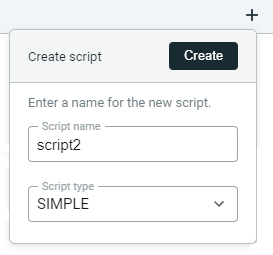
There are four types of scripts:
Init
- Purpose: Init scripts execute once at the beginning of the vision application.
- Usage: These scripts are ideal for initializing configuration variables, preparing modules, or setting up essential resources needed throughout the application's lifespan.
- Example of use: Initializing libraries, loading initial data, setting up environment configurations.
Simple
- Purpose: Simple scripts execute immediately after the init scripts.
- Usage: They are used for one-time operations that do not need to repeat during runtime or using loops to create cyclic executions manually.
- Example of use: Performing initial image processing tasks, setting up initial UI components or define a cyclic sequence with more control of the execution frequency.
Cyclic
- Purpose: Cyclic scripts execute repeatedly in a loop after the init scripts.
- Usage: They are employed for continuous tasks such as real-time processing, ongoing monitoring, or iterative operations.
- Example of use: Real-time video analysis, continuous data acquisition and processing.
End
- Purpose: End scripts execute at the conclusion of the runtime.
- Usage: They handle final operations, clean-up tasks, or logging before the application terminates.
- Example of use: Saving results, closing connections, releasing resources.
Terminating statement
One important rule to follow in OneVision Scripts is that all instructions should end with a semicolon ;. This rule helps the compiler parse the code correctly and prevents ambiguity in statements.
For example:
// Correct instructions
var age: number = 30;
var name: string = "Alice";
var isStudent: boolean = true;

// Incorrect instruction
var day: number = 30