Configuring Signals
System signals are automatic signals used to send the status of the application to external devices like a PLC or robot, and receive commands from them, like program start/stop commands or to load a different project.
To add a system signal you have to check the enable checkbox, assign it to a controller and give it a variable name.
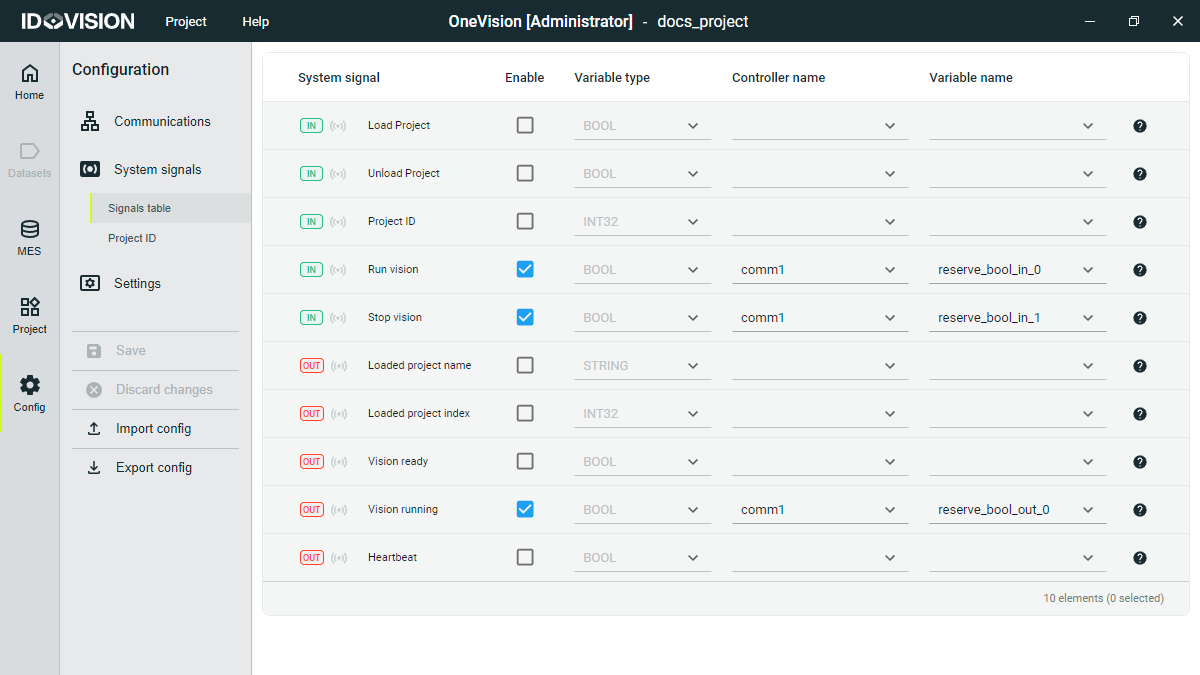
The signals are sent and received via the communication interfaces configured in the Communications tab.
The Onevision input system signals are:
- Load project (BOOL): Request to load a new project.
- Unload project (BOOL): Request to unload the current project.
- Project ID (INT32): Numeric identifier of the program to load.
- Run Vision (BOOL): Request to start the program.
- Stop Vision (BOOL): Request to stop the program.
The Onevision output system signals are:
- Loaded project name (STRING): Name of the loaded project.
- Loaded project index (INT32): Current project index if configured in the project table.
- Vision ready (BOOL): Indicates that the runtime is ready to start.
- Vision running (BOOL): Indicates that the program is running.
- Heartbeat (BOOL): Alternating signal to check the communication status.