Software Logs
Software logs are essential for tracking and diagnosing operational events and issues within OneVision. These logs provide valuable insights into system behavior, errors, and performance metrics, aiding in troubleshooting and maintenance tasks.
Types of logs
| Log Type | Description |
|---|---|
| INFO | Provides informational messages about the application's operational status and significant events. |
| DEBUG | Includes detailed debugging information useful for troubleshooting and diagnosing issues. |
| WARN | Logs warnings and potential issues that do not prevent the application from functioning but may require attention. |
| ERROR | Logs critical errors and exceptions that impact the application's functionality or user experience. |
In Settings, each service in OneVision includes a log level parameter that acts as a filter for the type and detail of logs displayed or saved. Selecting a specific log level determines which categories of logs are visible or recorded. This is how logs are filtered depending on which type of log level is selected:
- INFO (Production): Displays informational, warning, and error messages relevant to monitoring the application's production environment.
- DEBUG (Show All Logs): Shows all logs, including detailed debugging information useful for diagnosing issues during development or testing phases.
- WARN (Just the Warnings and Errors): Filters logs to display warnings and errors, providing a balance between information and critical alerts.
- ERROR (Just the Errors): Shows only critical errors and exceptions, useful for identifying and addressing major issues affecting application functionality.
Show logs
To view the OneVision logs:
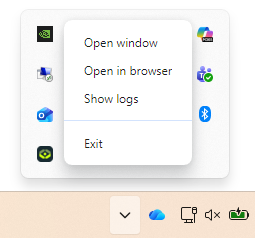
- Right-click on the OneVision icon on the taskbar.
- Select
Show logsfrom the context menu. - An Explorer window will open at the following location:
C:\Users\user\AppData\Roaming\OneVision\logs.
Log file format
The OneVision logs consist of multiple files named according to their creation date, such as log-2024-06-19-16.log. Each log file contains entries formatted as follows:
15:05:35 | info | ProjectService::loadProject() | Project with name 'example' opened in station 'Vision'
- Timestamp: Indicates the time when the log entry was recorded.
- Log Level: Indicates the severity or type of log message (e.g.,
info,warn,error). - Message: Describes the event or action captured by the log.