Understanding the Image Buffer
Here we will describe how the camera images are stored in the image buffer. First of all, the size of the buffer is configured in the image buffer size parameter.
The image buffer is actually composed of two buffers, the input buffer and the output buffer. The sum of both buffers is the total size of the image buffer.
- Input buffer: These are the image containers that will be written by the camera when new images are received. They are the "available images".
- Output buffer: These are the image containers that have already been filled, and are waiting to be retrieved by the user. They are "locked" until they are retrieved.
In the status panel you can monitor in real time the number of image containers available in each buffer. The total number of images that have arrived is shown in the image count field.
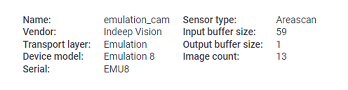
This is how the buffers work:
- When the camera is first connected, empty image containers are created and placed in the input buffer.
- When a new image arrives from the camera, an empty container is taken from the input buffer, is written with the data, and then is placed in the back output buffer.
- When the user requests an image, the first image (the oldest) in the output buffer is taken and returned to the user. The image container is then removed from the output buffer and placed in the input buffer.
- If the camera is streaming images faster than the user is retrieving them, the input buffer will be emptied until there is one last image left. At this point, images are automatically discarded from the output buffer and returned to the input buffer to make room for the new images.
- In video mode, only the last image in the output buffer is kept, the rest are discarded, so the output buffer size will always be 1.