Add Pages
The Visualization section lets you configure the elements that can be displayed in the Home page. These elements are accessible from the code to update its properties during production.
The main goal of visual elements is to enable user interaction in production. This can be achieved by displaying information from processed results (images, charts, text, numbers) or by allowing you to input some type of information (press a button, select an item from a dropdown, enter an identifier, etc.). By combining these various elements and making them interact with each other, it is possible to create very complex user interfaces.
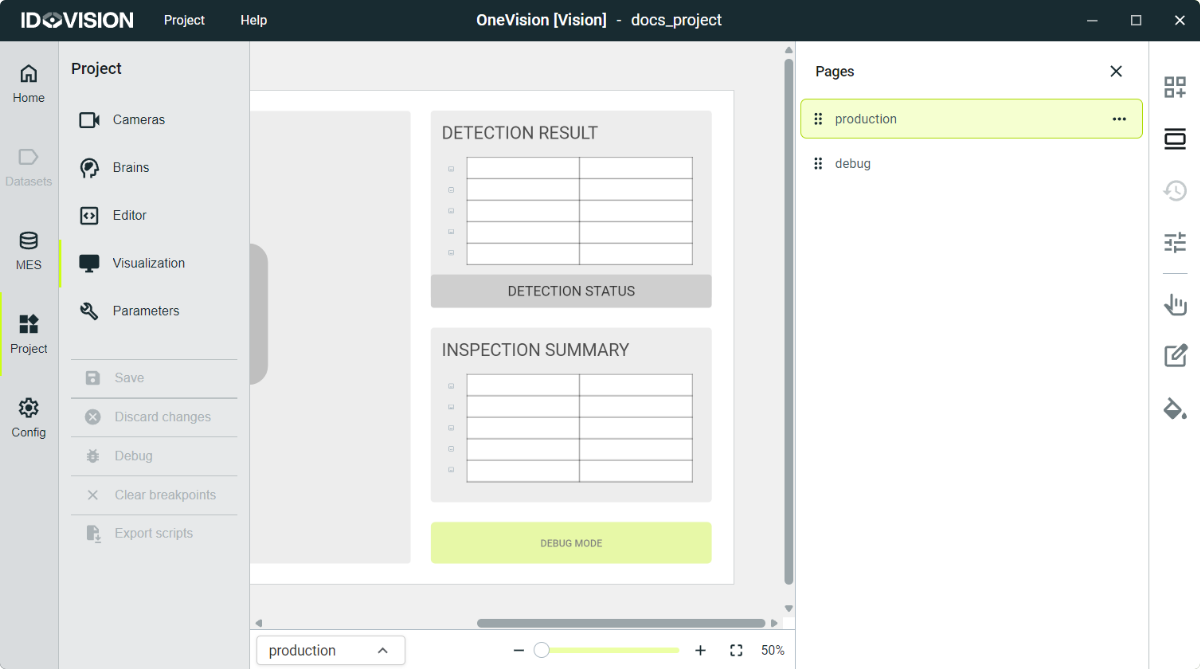
The Home display view is organized into multiple pages. During runtime you can navigate them using buttons or variables defined in the code. This structure allows you to create different pages for different users or products, with varying levels of detail and information.
To create a page go to Visualization in the Project section. Then click the second button in the right side bar to open the pages menu. Here you will see all the created pages, and by clicking on the three red dots next to the names, you can rename the pages, remove them or create a new one.
You can change between pages in the Visualization section with the page selector at the bottom of the screen.